...

ChatGPT vs Claude vs Gemini: Which AI Model Is Best for Your Tasks?

Share article:

Learn how DataDock AI.ai is changing the game in market strategy development by harnessing the power of Natural Language Processing (NLP). Find out how this advanced technology can provide actionable insights and drive strategic decisions. Lorem ipsum dolor sit amet consectetur. Duis quis amet nunc vulputate dolor. Scelerisque ligula velit nulla faucibus donec pellentes massa mi. Aliquam in fusce semper aliquam egestas mauris est nunc. Et pellentesque sodales elementum cursus mattis etiam nulla odio. Molestie tristique cursus ipsum non vitae nibh amet lacus.

Massa sit sit nisl pretium quisque ornare nunc posuere nunc. Et at est varius pulvinar sodales massa pulvinar risus. Orci at ipsum tellus posuere nunc. Auctor malesuada placerat scelerisque est. Sed tellus sit cras lectus risus ante. Scelerisque cursus risus sodales habitasse nibh volutpat. Eget libero aliquet hendrerit et tellus aliquam enim proin elementum.

Enim purus nulla nunc accumsan suspendisse gravida dolor nulla. Eget diam elit rhoncus dui integer egestas. Eget sagittis tortor arcu id nec eu integer morbi risus. Posuere egestas ac penatibus imperdiet. Adipiscing rhoncus blandit tortor in. Tortor sagittis massa adipiscing in at nam placerat tincidunt integer senectus a sapien. Etiam vel elementum varius in leo. Vitae id magna laoreet mauris. Sapien tellus sit blandit sit.

Choosing an AI tool used to be relatively simple. You picked a chatbot, typed in a prompt, and saw what it could do. That decision is much harder today.

ChatGPT, Claude, and Gemini can all help you write, research, code, analyze information, work with documents, brainstorm ideas, and handle everyday professional tasks. The bigger question is no longer whether these AI tools are capable. It is which one is better suited to what you are trying to accomplish, and there is no single answer. ChatGPT may be a better fit for one workflow, Claude for another, and Gemini for something else entirely. Even within each platform, different models and modes may be optimized for different kinds of work, so instead of trying to declare one universal winner, this guide compares ChatGPT vs Claude vs Gemini by task to help you decide which AI makes the most sense for the work you actually do.

All three platforms continue to evolve quickly, and the quality of an answer can depend on the specific model, prompt, files provided, tools available, and complexity of the task. The better way to compare them is to ask: What do I need AI to do?

What Are the Biggest Differences?

At a basic level, ChatGPT, Claude, and Gemini overlap considerably. All three can answer questions, generate and edit text, reason through problems, work with files, and assist with technical and professional tasks. The differences become clearer when you look at the broader experience around the model.

ChatGPT

ChatGPT is designed as a broad AI assistant rather than simply a text-generation tool. Depending on the plan and settings, it can search the web, conduct multi-step deep research, analyze uploaded files and images, perform data analysis, generate and edit images, and assist with coding. That strength makes ChatGPT a strong option for people who want one AI environment for many different kinds of tasks.

Claude

Claude has become particularly prominent in coding and knowledge-work workflows. Anthropic describes its latest model families as focused on areas including coding, research, and professional knowledge work, while Claude Code provides a dedicated environment for software-development tasks. Claude is therefore particularly worth considering when your work involves substantial writing, complex reasoning, large amounts of context, or software development.

Gemini

Gemini’s biggest distinction is its connection to Google’s broader ecosystem. Gemini can analyze documents, spreadsheets, images, videos, and other uploaded content. Its Deep Research capability can use Google Search and, where connected, sources such as Gmail and Google Drive. Google has also continued expanding Gemini’s agentic and multimodal capabilities. For someone whose workflow already revolves around Google products, that integration can be a significant advantage.

ChatGPT vs Claude vs Gemini at a Glance

This is not a ranking.
task ChatGPT Claude Gemini
Writing General-purpose: brainstorming to editing, with research and file analysis in the same workflow Long-form and professional knowledge work: reports, detailed drafts, structured writing Writing connected to Google tools; generates documents and common file formats from a conversation
Research Deep Research: multi-step, public web and uploaded files, structured reports with citations Increasingly positioned for sophisticated research and knowledge work Deep Research with Google Search by default; can add files, Gmail and Drive when connected
Coding Generate, explain and debug code; useful when coding is part of a larger task Strong coding proposition; Claude Code for software-development tasks Developed for coding and agentic workflows; integrated into developer environments
Documents and analysis File uploads, summaries, extraction; data analysis for spreadsheets and CSVs Documents, spreadsheets, presentations, research and analysis Documents, spreadsheets, notebooks, images, video and other file types
Everyday work Flexible assistant across writing, analysis, research, coding and creative work Days built around writing, documents, coding or complex knowledge work Workflows closely tied to Google products and ecosystem
Summarized from the task sections below. Capabilities depend on plan, model and settings.

Which Is Best for Writing?

There is no objective winner for every writing task. The better choice depends on what you are writing and the kind of assistance you need.
ChatGPT is a strong general-purpose writing assistant. It can help move from brainstorming to outlining, drafting, rewriting, and editing while also handling research or file analysis within the same broader workflow. OpenAI explicitly positions writing, rewriting, and summarization among ChatGPT’s core capabilities. Claude is particularly compelling for long-form and professional knowledge work. Anthropic’s current models are positioned heavily around knowledge work alongside coding, making Claude worth testing for tasks such as reports, detailed drafts, document analysis, and structured professional writing. Gemini becomes especially useful when the writing process is connected to Google tools or requires working across different types of source material. Gemini can analyze uploaded files and generate documents and other common file formats directly from a conversation.

best approach

For important writing, test the same brief across more than one model. Tone, structure, and adherence to instructions can vary enough that your preferred model may depend on the type of content you are producing.

Which Is Best for Research?

Research is one of the clearest examples of why choosing by task matters. ChatGPT’s Deep Research is designed for multi-step research. It can search the public web, work with uploaded files, and synthesize information into structured reports with citations. Gemini also offers Deep Research. Google Search is included as a source by default, and users can add sources such as uploaded files and, when connected, Gmail and Drive. Claude is also increasingly positioned for sophisticated research and knowledge work. Anthropic describes its newest advanced models as having research capabilities alongside their coding and professional-work strengths.
So which should you choose? For research, don’t judge an AI only by how polished its final answer sounds. Consider whether it can:
For high-stakes research, AI should accelerate the process rather than eliminate verification.

Which Is Best for Coding?

Coding is another area where all three platforms are serious contenders. Claude has a particularly strong coding proposition. Anthropic has invested heavily in Claude Code, and its recent model releases continue to emphasize software engineering and complex coding tasks. ChatGPT can also assist throughout the development process, including generating code, explaining existing code, debugging, and working with code in dedicated interactive experiences. Its broader toolset can also be useful when coding is only one part of a larger task.
Google, meanwhile, continues to develop Gemini specifically for coding and agentic workflows. Recent Gemini Flash releases emphasize software engineering, web development, and AI-agent workloads, while Gemini is also being integrated into developer environments. The practical choice therefore depends on your workflow. A developer working deep in a repository may prefer a different AI than a marketer who occasionally needs help fixing HTML, writing a SQL query, or understanding a Python script. “Best AI for coding” is still too broad a question.

Which Is Best for Documents and Analysis?

For document-heavy work, context matters just as much as raw model intelligence. ChatGPT supports file uploads and can summarize documents, extract information, and answer questions about them. It also includes data-analysis capabilities for structured files such as spreadsheets and CSVs. Gemini supports documents, spreadsheets, notebooks, images, video, and other file types, making it particularly relevant for workflows involving multiple forms of information.
Claude’s recent models are also designed for professional knowledge work involving documents, spreadsheets, presentations, research, and analysis. The important question here is not simply whether an AI supports PDFs. Ask what happens after you upload the information. Can it understand a long document? Compare several sources? Extract the details you care about? Analyze the information accurately? Turn that analysis into something useful? Those differences are much more meaningful than a checkbox saying “file upload supported.”

Which Is Best for Everyday Work?

For everyday professional use, the answer depends heavily on where your work already happens. If you want a flexible assistant that can move between writing, analysis, research, brainstorming, coding, and creative work, ChatGPT’s depth makes it a strong general-purpose option. If your day involves substantial writing, documents, coding, or complex knowledge work, Claude may fit particularly well.
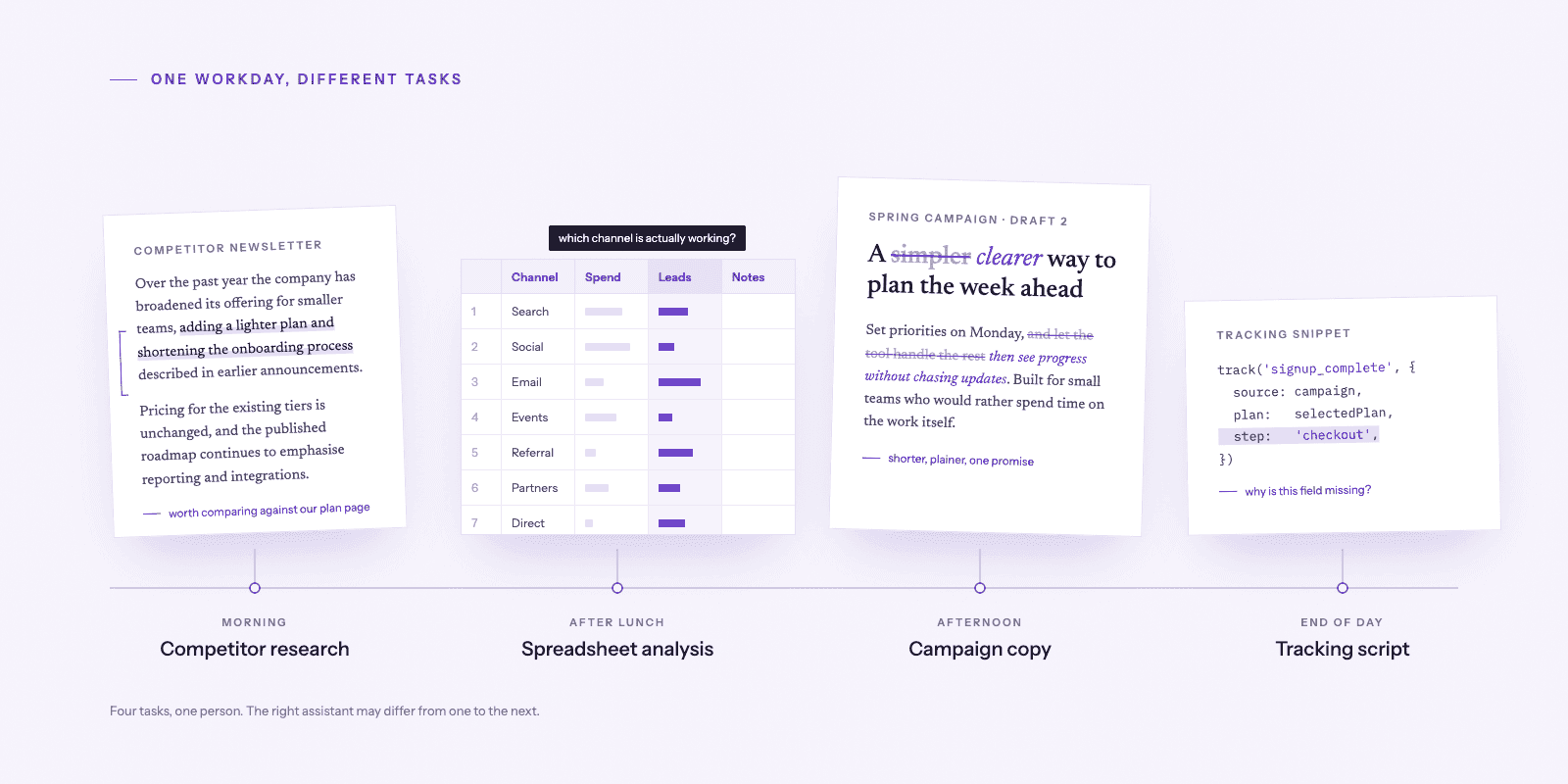
If your workflow is closely tied to Google products and information across Google’s ecosystem, Gemini’s integrations can make it especially convenient. But many people do not have just one type of workday. A marketer might research competitors in the morning, analyze a spreadsheet after lunch, draft campaign copy in the afternoon, and ask for help with a tracking script before the day ends. That is exactly where choosing one permanent “best AI” becomes less useful.

ChatGPT vs Claude

Choose between these based on workflow, not a universal score. ChatGPT suits users who want a broad assistant spanning research, analysis, writing, and creative tasks. Claude is worth testing for sustained writing, complex documents, and coding-focused work. Try both on the same real assignment before deciding.

ChatGPT vs Gemini

ChatGPT offers a flexible mix of tools for varied tasks. Gemini may be more convenient when your documents, communication, and research already live in Google’s ecosystem. For work that crosses platforms, compare how each handles your actual files and sources.

Claude vs Gemini

Claude is a strong candidate for document-intensive knowledge work and software development; Gemini stands out when Google integrations and multimodal inputs matter. The better fit depends on whether your priority is deep work on a task or connected work across tools.

A Quick Test to Find Your Best AI Model

Try this identical prompt in all three tools:
“Summarize this two-page business report in five bullets, identify three risks, and flag any claims that need verification.”
Upload the same report, then compare factual accuracy, missed details, clarity, and how well each follows instructions. This is a suggested test, not a claim that we ran one; results will depend on the models and settings you use.

So, Which AI Should You Choose?

Start with your task, not the brand. If you primarily want one flexible assistant for many different kinds of work, start by testing ChatGPT. If your priorities are coding, long-form writing, and complex knowledge work, put Claude high on your list. If you rely heavily on Google’s ecosystem or frequently work across multimodal information and Google-connected workflows, Gemini deserves serious consideration.
But don’t treat those recommendations as fixed rules. AI models are improving quickly. A model that performs best for a particular task today may not hold that position after the next major update. More importantly, your own definition of “best” matters. For one person, the best model produces the most thoughtful answer. For another, it is the fastest. Someone else may care more about integrations, privacy, ease of use, or the ability to work with particular file types. That leads to a more useful question:

What If You Want to Use More Than One AI Model?

You don’t necessarily have to commit to a single AI ecosystem. Different models have different strengths, and those strengths can change as new versions are released. Using multiple models lets you choose based on the task instead of forcing every task through the same assistant. The problem is that a multi-model workflow can quickly become fragmented. You may end up maintaining different accounts, switching between interfaces, comparing models manually, and moving information from one tool to another.
Basin One is designed around a different approach: start with what you want to accomplish.
Basin One brings multiple supported AI models into one workspace and helps you discover and choose models based on the task. You can select a model directly when you already know what you want, or use Basin’s task-based discovery and model-selection tools when you don’t. The goal isn’t to tell you that one model is always best; it’s to make it easier to use the right model for the right task because the future of AI may not be about choosing between ChatGPT, Claude, and Gemini once. It may be about having the flexibility to choose differently every time your task changes.
Find the right AI model for your task with Basin One.
on this page
    Add a header to begin generating the table of contents
    Scroll to Top

    Related articles

    Price tag icon
    Yearly plans discount - 20% off

    Get a discount by paying yearly. Contact us to learn more.

    Enterprise: Enterprise & Institutions

    For large organizations and institutions with specialized requirements, this plan offers customizable solutions. Contact us for options like multiple API keys, priority support, redistribution rights, or unlimited data access. Example use cases include:

    Scale: Business / Internal Use

    Built for organizations leveraging the platform for internal operations, this tier supports data-driven teams and professionals. Common applications include:

    Growth: Personal & Startups

    Designed for innovators, individual developers, and university researchers, this plan supports small-scale projects and early-stage experimentation. Typical scenarios include:

    Explorer:

    For testing purposes.
    Seraphinite AcceleratorOptimized by Seraphinite Accelerator
    Turns on site high speed to be attractive for people and search engines.